SharePoint as an intranet vs LumApps: which one is better?
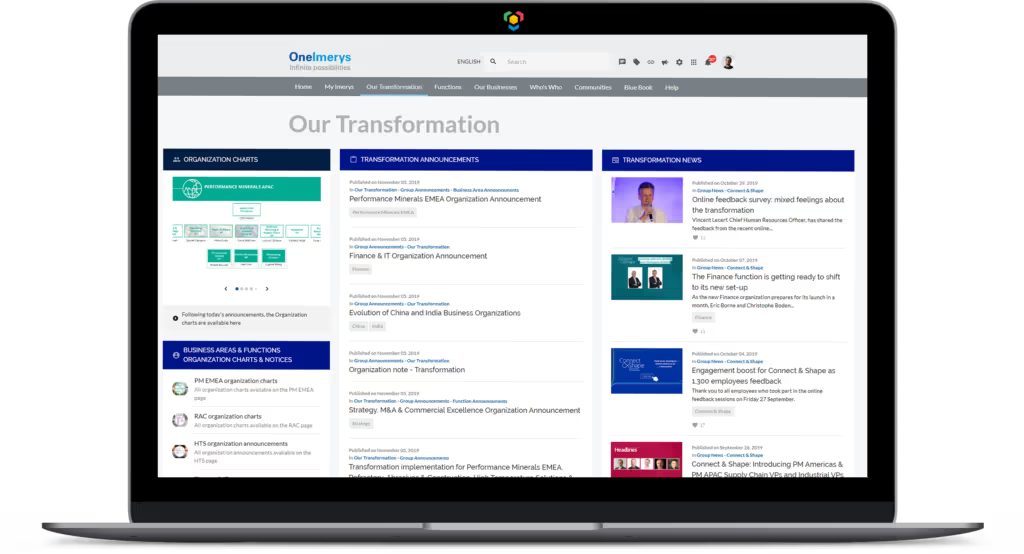
LumApps and SharePoint are both popular platforms designed to enhance internal communication and collaboration within organizations, but they have distinct differences in terms of focus, features, and user experience.
This article breaks down the differences between LumApps vs SharePoint and how to determine which is best for your company.
What is LumApps?
LumApps is an employee intranet known for its user-friendly interface and emphasis on employee engagement. It offers a visually appealing and customizable intranet experience that integrates seamlessly with various business tools. LumApps places a significant emphasis on social features, enabling employees to interact through comments, likes, and shared content. It promotes knowledge sharing, personalization, and news delivery, creating a dynamic and engaging environment.
LumApps is often chosen for its intuitive design and strong focus on improving internal communication and employee experience. The LumApps intranet integrates with Microsoft Teams and Google Workspace, but it helps improve productivity with built-in technology like the ability to self-serve common IT or HR tasks.
What is SharePoint?
Sharepoint is a collaboration platform created by Microsoft that offers features like document management, team sites, workflow automation, and content sharing. The name comes from the ability for employees to “Share a Point of view.” The key strength of SharePoint is the document management system and its ability to connect with Microsoft Teams. While it supports intranet capabilities, SharePoint caters more to business needs like managing documents and building custom applications. SharePoint is deeply integrated with the Microsoft ecosystem, which can be advantageous for organizations already using Microsoft tools.
Microsoft Viva is a separate tool from SharePoint and will not be covered in this article.
What is the difference between LumApps intranet and SharePoint?
LumApps and SharePoint are quite different. LumApps is an employee intranet at its core, and SharePoint is more of a document management system at its core. SharePoint is best known as a document sharing platform, and has to be configured and developed to provide intranet functionality.
LumApps is an employee intranet that allows for both top-down communication and bottom-up communication where employees can create posts, comment, share, and engage with posts from coworkers.
LumApps intranet integrates with Microsoft Teams so you can use your existing Microsoft Teams logins and share updates across both platforms - your LumApps intranet or send a blast through Microsoft Teams channels. This is helpful because you can broadcast news onto Teams channels, quickly notifying users of important content and meeting them where they are working.
LumApps excels in user-friendly design and engagement-focused intranet capabilities, while SharePoint offers strong document management, workflow automation, and application development.
The choice between LumApps and SharePoint depends on an organization's specific requirements, preferences, and existing technology landscape. Here’s a complete overview to compare the features offered by LumApps and SharePoint. See how they compare to choose the best solution for your company.
LumApps vs Microsoft SharePoint : Intranet Features Overview
| Features | LumApps | SharePoint |
|---|---|---|
| Platform-wide search | Yes, and also searches external company resources from tools like Jira, ServiceNow, O365 and Workday. | Yes |
| Integrates with Google Workspace | Yes, LumApps is a Google Workspace Partner | No |
| Integrates with Microsoft | Yes, LumApps is a Microsoft 365 Partner | Yes |
| Digital assistant chatbot | Yes | Yes |
| Ability to customize branding | Yes, fully customizable brand colors and design | Yes, limited |
| Personalized news feed for each employee | Yes | Yes |
| Advanced analytics on content consumption | Yes | Yes |
| Multiple deployment sites available | Yes | Yes |
| Mobile application | Yes, everything happens in 1 app | Yes |
| Video | Yes, natively integrated, with secure video handling | Yes |
LumApps vs SharePoint on user interface and user experience
For individuals already familiar with Microsoft products like Office 365, SharePoint's interface and navigation may feel more intuitive due to its integration with Microsoft. However, for those who are new to these tools, there might be a learning curve involved, especially when exploring its advanced features. Microsoft's commitment to improving user experience means that, with proper training and time invested, many users find SharePoint to be manageable and valuable for their needs.
SharePoint excels in file storage in shared libraries and the ability to create sites for each team, department, or division of a company. It is very easy to create a new team site, which some teams find becomes hard to manage and keep up with over time, as sites can be quickly created as stand-alone pages without linking to each other.
The tool is quite complex, but SharePoint has made efforts to improve its user experience over time, with modern templates and simplified interfaces that enhance usability. The platform provides user-friendly options for tasks like document sharing, version control, and collaboration on team sites.
LumApps has a user-friendly interface that is made for employees of all levels to easily connect and collaborate from anywhere. The software is called a “no-code” because anyone can make updates in the content management system without needing advanced technical skills or assistance from an IT administrator.
LumApps vs SharePoint on social intranet features
LumApps places a strong emphasis on creating a vibrant social intranet environment. It offers features like news feeds, commenting, liking, and sharing capabilities. These social features encourage real-time interactions among employees, facilitating knowledge sharing, discussions, and feedback. LumApps has community spaces to create collaborative groups or even affinity groups to increase camaraderie around topics outside of work.
LumApps’ native social functionalities create a dynamic space for idea exchange, team updates, and informal communication, enhancing overall engagement and collaboration.
While versatile in many collaboration aspects, SharePoint offers social features as a part of its broader collaboration ecosystem rather than a primary focus. It includes features like news articles and comments, but these are integrated within its larger framework of document management, team sites, and workflow automation.
LumApps intranet vs SharePoint on content management
SharePoint does not provide language management – content can only be published in one language. LumApps, however, natively supports multiple languages and employees can set their own language preferences.
LumApps provides an intuitive and visually appealing platform for content management, making it easy for non-technical users to create and manage content. LumApps supports advanced tagging and metadata management, allowing content to be personalized based on user roles, preferences, and interests, enhancing relevance and engagement. LumApps offers templates for different types of content, simplifying the process of creating consistent and visually appealing content.
SharePoint offers advanced metadata tagging and categorization options, but requires advanced customization to enable efficient content organization and discovery. SharePoint's breadth of features might lead to a steeper learning curve, especially for users new to the Microsoft ecosystem. While versatile, SharePoint's comprehensive nature might be overkill for organizations with straightforward content management needs. Managing a customized SharePoint environment might require dedicated IT resources for maintenance and updates.
LumApps intranet vs SharePoint on customization and branding
Both platforms offer customization options, but LumApps includes much more extensive branding options that are easy to implement. LumApps allows for full customization and branding options, but SharePoint requires advanced customization through CSS. LumApps caters to enterprise companies, especially companies that have multiple brands and want to serve up a customized intranet for each one.
So which intranet should you choose?
In conclusion, LumApps and SharePoint offer different strengths and weaknesses that align with specific organizational requirements. LumApps excels in creating an engaging, user-friendly intranet experience with a strong focus on internal communication and social interaction. With LumApps, you don’t need to rely on IT for updates, maintenance, or building out new sites. SharePoint, on the other hand, provides a versatile and comprehensive collaboration platform that encompasses document management, workflow automation, and integration capabilities. Choosing between the two depends on factors such as the organization's size, collaboration needs, technical expertise, and existing technology ecosystem.

Questions
Pros/Advantages :
- Document Management: SharePoint excels in document storage, version control, and resource sharing, making it ideal for managing organizational knowledge.
- Integration: It integrates well with other Microsoft Office 365 products, promoting smooth workflows.
- Customization: SharePoint offers flexibility in customization, allowing your IT team to tailor the intranet to your specific needs.
Cons/Disadvantages :
- Complexity: SharePoint can be complex to set up and use, requiring significant technical expertise.
- User Adoption: Due to its complexity, user adoption rates can be lower unless extensive training is provided.
- Maintenance: Ongoing maintenance and updates can be resource-intensive.
How LumApps Optimizes the Pros and Corrects the Cons of SharePoint as an intranet ?
- Simplified User Experience: LumApps provides an intuitive interface that simplifies navigation and usage, making it easier for all employees to adopt.
- Enhanced Integration: While maintaining seamless integration with Microsoft Office 365, LumApps enhances the intranet experience by offering additional social features and personalized content.
- Streamlined Management: LumApps reduces the complexity associated with SharePoint, offering a more streamlined and user-friendly platform that requires less maintenance.
While SharePoint is a powerful tool for document management and integration, LumApps can help optimize its strengths and address its weaknesses, offering a comprehensive and efficient intranet solution that is easy to use and maintain.
For more information on how LumApps can transform your intranet experience, feel free to reach out to our team. Let’s make your enterprise communications smoother and more effective than ever.
Not exactly. SharePoint was not originally designed solely as an intranet. It was initially developed as a document management and storage system. However, its robust features and capabilities have enabled it to evolve into a comprehensive hub for resources sharing for many enterprises. Some companies surely use it as an intranet, but it might not be as adapted and flexible as LumApps' solution.
SharePoint is a Microsoft collaboration platform that functions as an intranet with document management capabilities. Organizations use it to create communication sites, team workspaces, and knowledge repositories, though it often requires customization to match modern intranet expectations. It works best for companies already invested in the Microsoft ecosystem.
Yes, SharePoint can be used as an intranet, and in fact, many organizations use SharePoint as the foundation for their intranet platforms. SharePoint offers many of the core features needed for an intranet:
- Content Management: SharePoint provides robust content management capabilities, allowing organizations to create, publish, and manage web pages and documents.
- Document Management and Collaboration: SharePoint excels at document storage, management, and collaboration, with features like version control, check-in/check-out, and co-authoring.
- Team Sites and Workspaces: SharePoint allows the creation of team sites and collaboration workspaces for different departments or projects.
- Search Functionality: SharePoint includes powerful search capabilities to help users find documents and information across the intranet.
- Integration with Microsoft Ecosystem: SharePoint integrates seamlessly with other Microsoft products like Teams, Outlook, and Office 365, creating a unified digital workplace.
- Personalization: SharePoint supports personalization and targeted content delivery to different user groups.
However, there are some limitations and considerations:
- Steep Learning Curve: SharePoint can be complex to set up and maintain, requiring dedicated IT resources and expertise.
- User Experience: Out-of-the-box SharePoint may not provide as intuitive and engaging a user experience as dedicated intranet platforms like LumApps.
- Employee Engagement Features: While SharePoint provides basic communication features, it may lack some of the more advanced engagement and collaboration features found in dedicated intranet solutions.
- Mobile Experience: Although SharePoint's mobile experience has improved, it may not be as seamless as dedicated mobile-first intranet solutions.
In summary, while SharePoint can be used as an intranet, many organizations augment it with dedicated intranet solutions like LumApps to provide a more engaging, user-friendly employee experience.