How enterprise chatbots and conversational AI support IT and HR

Many organizations exploring how to create a chatbot are ultimately looking for a better way to support employees. With its intuitive natural language conversational interface, a digital assistant integrates into an employee's work environment to support them daily and increase their productivity.
Automation and Artificial Intelligence technologies are fundamentally changing the way organizations work, freeing employees from recurring non-value-added tasks to spend time on more high-value projects.
For management consultancy Bain & Company, "Conversational AI will underpin many human-to-digital interactions, with virtual agents increasingly able to manage interactions, looping in people only where necessary."
How to create a chatbot for the workplace
Many people searching for how to create a chatbot or build an AI chatbot are trying to solve a specific problem. They want to help employees find answers faster, reduce repetitive requests, and improve support across teams.
In enterprise environments, the solution looks different.
Organizations are not just building chatbots. They are creating connected experiences that help employees access knowledge, complete tasks, and move work forward.
Instead of standalone bots, modern enterprises use conversational AI embedded directly into a connected employee hub. This brings together knowledge, tools, and workflows in one place, so employees can get what they need without switching systems.
Traditional chatbot development often requires coding, training models, and ongoing maintenance. Enterprise conversational AI focuses on integration, context, and usability.
- Connect AI to HR systems, knowledge bases, and business tools
- Deliver fast, contextual answers through natural language
- Automate everyday workflows like IT requests or HR processes
- Create a consistent experience across web, mobile, and collaboration platforms
The result is not just a chatbot, but a smarter way to support employees at scale and reduce friction in the flow of work.
This impact is especially visible in two areas where employee support and efficiency matter most: IT and HR.
With employees spread all over the world, in the office or working from home, companies need to be able to function optimally while attracting and retaining their talents.
What is an internal chatbot
An internal chatbot is a conversational AI tool designed to support employees within an organization. Unlike customer-facing chatbots, internal chatbots focus on helping employees access information, complete tasks, and navigate systems more efficiently.
In modern digital workplaces, internal chatbots are embedded within employee hubs, connecting knowledge, tools, and workflows in one place. This allows employees to get answers quickly without searching across multiple platforms.
Examples of conversational AI in the workplace
Conversational AI is used across teams to streamline everyday work and reduce friction.
Common examples include:
- IT support assistants that reset passwords or manage access requests
- HR assistants that answer policy questions and guide employees through onboarding
- Knowledge assistants that surface documents and resources instantly
- Workflow assistants that help employees complete tasks directly within chat interfaces
These examples show how conversational AI moves beyond simple chatbots to become part of how work gets done.
How chatbots and digital assistants optimize IT support
A 1000-employee company uses an average of 177 SaaS applications. That means more applications, more interfaces, and more FAQs to empower users, but also less autonomy and a constant increase in the number of requests to IT support teams!
In 2021, 70% of internal support managers reported an increase in employee requests.
As consumers, we are accustomed to frictionless experiences like Amazon, Netflix, and Apple. How can businesses keep up with increased requests and provide the same frictionless employee experience at work?
The solution? An IT digital assistant (with integrated chatbot technologies) is an ideal, single point of contact for employees to self-serve typical IT tasks like resetting passwords, creating new user accounts, or scheduling appointments to get new equipment.
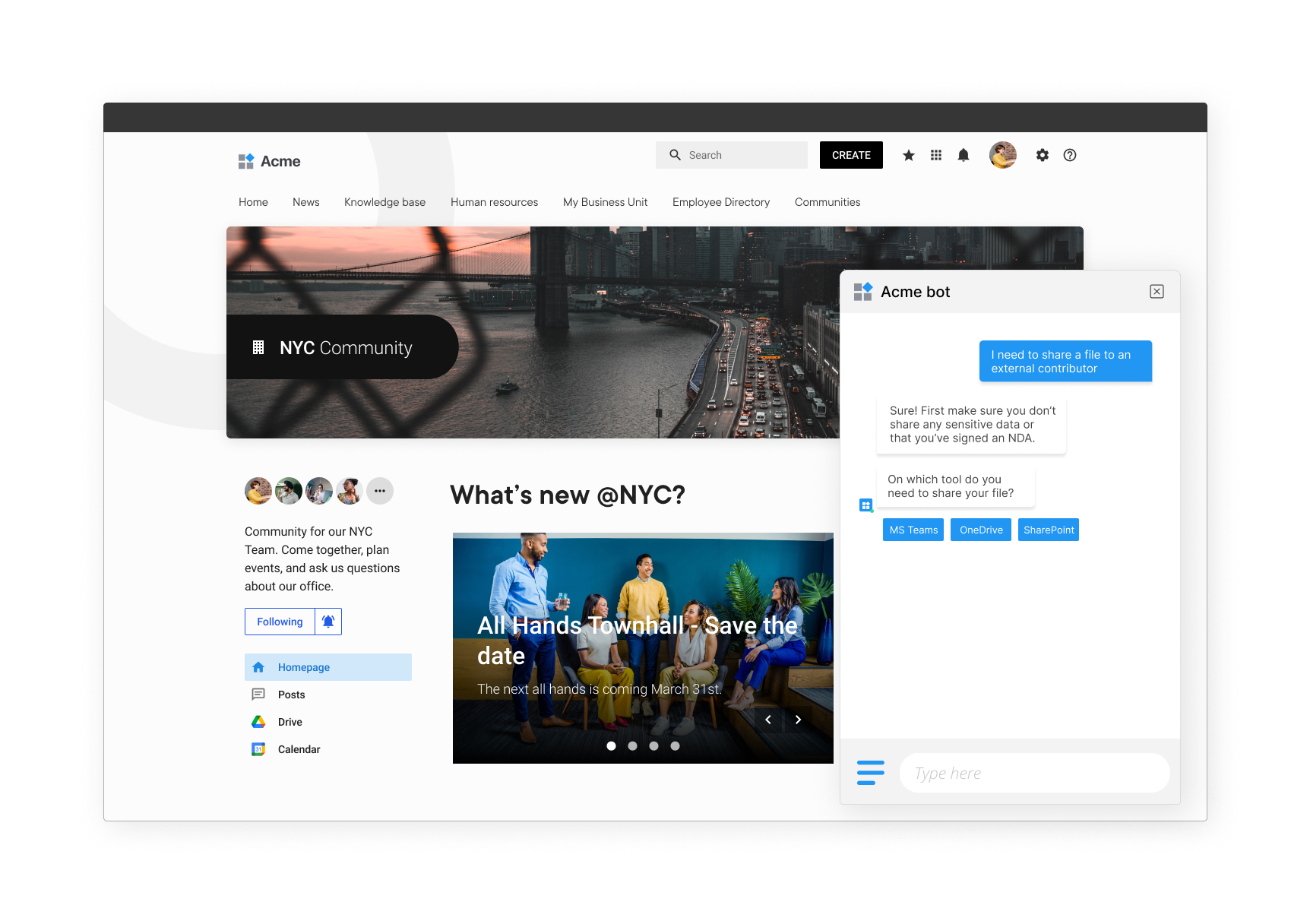
With its easy-to-use natural language conversational interface, an IT digital assistant can be incorporated into an intranet, a digital workplace, or an employee experience platform such as LumApps.
Plus, the LumApps digital assistant can sync with everyday business tools your employees are actively using such as Microsoft Teams, Google Chat, or Slack. By automatically indexing all the company's content sources, it searches the full knowledge bases to help employees solve their problems autonomously.
Our IT Digital Assistant brings new interactive services to our employees. We have reduced the number of calls to the Support team. It’s a very positive experience!
— Pascal Ribault, IT Support Manager at CDC Habitat
When necessary, it will also automate end-to-end workflows (e.g., reset a user's forgotten password or create an account in a business application). Finally, it will notify employees ("push notifications" on important information or events), with an open rate of 90%.
How a digital assistant supports HR operations
According to a global study by technological research and consulting firm Gartner, change management, employee experience, and the future of work all rank in the top 5 concerns among HR leaders' priorities for 2023.
An HR digital assistant can help expand your team by answering frequently asked questions on HR topics (such as labor agreements, administrative policies, salary, and vacations) in real time and in a conversational way. Not only can it look for answers within the intranet platform, but it can also connect with the company’s HR information system to deliver a full, complete answer.
It is also incorporated into the employees’ daily work tools (LumApps platform, Microsoft Teams, Google Chat, or Slack for example), and can send push notifications about important milestones. For example, "Don't forget to take your days off before such and such a date or you will lose them."

One of our customers, Imerys, used LumApps Digital Assistant to set up both an IT and HR bot on their platform.
When asked about their experience, this is what IT Director, Enabling Functions & Digital Innovation, Sébastien Levrot with Imerys had to say, “This has helped us avoid hundreds of additional support tickets and wasted resources. The digital assistant on our LumApps platform is a great way to get the best out of our internal tools and build a comprehensive employee experience at Imerys.”
Rapid implementation and intuitive handling
Launching a chatbot no longer requires complex, long-term development projects. Modern conversational AI platforms are designed for faster implementation, with pre-built integrations and no-code tools that reduce setup time.
Ten years ago, launching a chatbot project was relatively complex, reserving the implementation of this type of technology to large organizations, supported by IT consulting and services companies, for relatively long projects (from 1 to 3 years), and budgets often exceeding $200,000 for a single chatbot!
Today, organizations take a different approach. Instead of investing heavily in custom chatbot development, they adopt platforms that embed conversational AI into existing systems. This reduces both upfront costs and ongoing maintenance while improving scalability.
In the early 2020s, as the technology matured, organizations aiming for operational excellence integrated more internal bots to assist their teams. Today, chatbots and digital assistants are more functionally powerful, intuitive, and even easier to implement.
Whether for IT, HR, Support Services, or other needs, LumApps Digital Assistant can be installed on relevant LumApps web pages or accessible in our mobile app. It integrates with your team’s work tools like Microsoft Teams, Google Chat, or Slack. Plus, 40+ pre-built micro-apps can also be leveraged to trigger workflows in business apps. If you don’t find the tool you need, you can leverage our intuitive, no-code environment to build dedicated micro-apps.
It’s an almost "plug & play" integration for staff with sufficient administrative rights. The ultimate goal? Reduce the strain on your IT or HR team, and support employees in their daily activities, for a better employee experience.
Get a Digital Assistant to improve efficiency for your team. Book a demo today.
Get a Digital Assistant to improve efficiency for your team.
Discover our latest content on Artificial Intelligence
- How AI & Automation is Making Internal Comms Easier
- Friend or Foe: Opportunities and Dangers of Using Generative AI in Internal Communications
- Employee experience management: What are the best AI tools for businesses ?
- The Future of Employee Communications: AI-Powered Solutions and Trends
- Generative AI and the Employee Experience: How to Combine Them in Intranets
- LumApps + Coveo: Helping Employees be Continuously Informed
- How Conversational AI can help employees solve their own IT or HR requests
- How to streamline the workday using the new AI-powered Companion
- 3 ways to improve efficiency with AI in your intranet
- Leverage AI and GPT-like technology to streamline contribution and search
- Understanding AI in corporate communication: best practices
- How to use AI to alleviate the fear of the blank page
- 5 Ways Intranet Technology Can Improve Internal Comms
- What are the benefits of AI in the workplace ?
- LumApps Advances Conversational AI Development Strategy with Acquisition of Vizir
- LumApps places AI at the heart of its 2024 strategy to enhance employee experience
- Work Smarter with an AI-Powered Intranet
- Chatbots: Technological innovations for online communication.
- Elevate employee productivity with Companion | LumApps
- Automate mundane tasks and improve employee productivity | LumApps
- LumApps x ChatGPT Integration for an AI-powered digital workspace
- AI-Powered Transformation: Revolutionizing Internal Communications and Intranet Efficiency
- Webinar-Internal Comms and AI: alleviate the fear of the blank page
- Webinar: Unlocking the Power of AI in your Intranet: Top 3 ways AI can Transform your Internal Comms

Questions
Common examples include IT assistants that reset passwords or manage access requests. HR assistants can answer policy questions and guide people through onboarding. Knowledge assistants surface documents and resources instantly, without a manual search. Workflow assistants let employees complete tasks directly inside a chat interface.
An IT digital assistant gives employees one place to self-serve common requests. That includes resetting passwords, creating accounts, or scheduling equipment appointments. It can sync with everyday tools like Microsoft Teams, Google Chat, or Slack. By indexing company content, it helps people solve problems without opening a ticket.
An HR digital assistant answers frequent questions about policies, pay, and time off. It can search both the intranet and the company's HR system for a complete answer. It also lives inside everyday tools like Microsoft Teams, Google Chat, or Slack. Push notifications can remind employees about deadlines, like unused vacation days.
Start by focusing on the problem you actually want to solve, not the technology itself. Most workplace chatbots aim to help employees find answers faster and reduce repetitive requests. It should connect to your existing knowledge sources and daily tools. Rapid, intuitive setup matters more than a long, complex rollout.