Structuring your Intranet for maximum impact and recognition

Let us discover together a more technical side of the process of intranet platform building, focusing on the right structure of an intranet.
First steps towards the right structure
To be able to push the right content, you need to have the right structure. This architecture must respect the overall structure of the enterprise. To start building your intranet you must appoint a small team, usually from the IT, HR, Internal or Employee Communications departments. Don’t forget that training this team is of crucial importance! For instance, you must take the time to properly introduce all the features, in order for them to have full comprehension and freedom to govern.
The second step is to define employee roles. You need to agree on a workflow that will allow content authors to publish in the right place and to target the right employees. There can be some level of restriction for certain individuals, but access should be restricted mostly around content creation, without hindering information searchability.
After building your army of publishers you are now ready to create the right structure for a vibrant digital workplace. Here are three keywords that you should always have in mind when building the intranet:
- Communicate
- Connect
- Create
Your intranet is the place where employees can communicate, connect and create in order to be more efficient in their work. To do this, they must easily navigate their intranet and quickly reach the information they need.
Therefore the two next words are:
- Ease
- Ergonomy
4 functions for better information structure
Important – Always think from the user point of view
- Navigation Menu – Allowing fast access to all intranet tools. Menu items should be clear and should follow the corporate structure.
- Search – Speed identification of resources (people, document, news, etc). Search bar and Menu should be located where people normally expect to find them.
- Keywords and Tags – Include clearly defined tags to allow quick filtering and sorting of information. Highlight the list of main keywords and tags, when people search or create content.
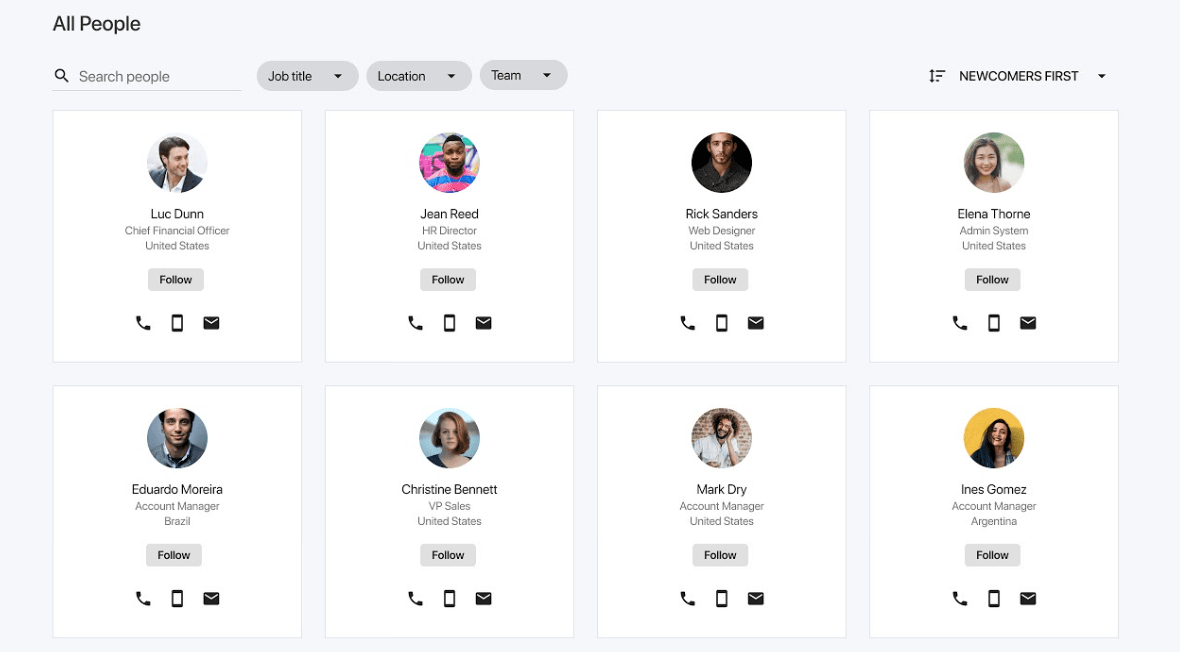
- User Directory – Easy way to find people according to their profile information.
A landing page that will land you an award
To ensure the fast adoption of your intranet, we’ve already seen that Design plays an important role. But after creating a nice first impression, it’s time to keep users’ attention and make sure they don’t get lost.

When you create the landing page think about the users first. Everyone wishes to see the most relevant information for them. You don’t have to personalize the widgets or colors according to each user. Simply add sections which will bring the user directly to the most pertinent information, for example, according to their team or interests.
After ensuring that employees see the latest news in their branch, city or team, you should also provide a global area where they can find everything.
3 Dashboards you need to have:
1. Groups and Communities dashboards
Users can explore all available groups and decide if they want to join. This will give them the liberty to choose which informational stream they want to follow.

2. Newsroom
After reading the latest and most relevant news, users should also be able to browse all news, for a global view of company culture, strategy and vision.

3. Office Directory
If you have multiple office locations this will allow users to connect faster and to stay up-to-date with their colleagues abroad.
2 ways to grow adoption
Lastly, we want to bring your attention to two features of the digital workplace that are essential for the fast adoption and future growth of your digital workplace.
1. Analytics
In order to improve your intranet, you must understand how your users actually use it. There is where KPIs can come in handy, such as daily and monthly active users, average engagement rate, most read content, CTR and more. These statistics must show up on your analytics dashboard so that you can make informed decisions about where to take your intranet.
2. Gamification
People like to play and compete, so a gamification tool is a given. Trust us, giving badges for reached goals – the number of likes, publications or participation to communities – will bring more engagement than you think. And it’s just one example of what you can do… As for drumming up team spirit, the rest is up to the intranet community managers!
Read more : An intranet for HR
Discover our latest content on Modern Intranet :
- Modern Intranet - Benefits & Features You Need for 2024
- How to Create the Best Company Intranet? The Full Guide
- Intranet Content: 15 Great Ideas & Strategies to Adopt
- 5 Essential Steps to Get the Best Mobile Intranet App
- How to Boost Intranet Engagement? Ideas, Strategies & Tools
- Building an Award-Winning Intranet: Design Matters!
- Building an Award-Winning Intranet: The Right Structure
- Intranet vs. Extranet: Differences & Comparison (With Examples)
- CMS Intranet: What it is & 15 tips to choose the best one
- 20 Must-Have Features for an Employee Mobile App - LumApps
- What is an Enterprise Social Network? Top Benefits and features
- 30 Essential Features Your Company Intranet Should Have
- 15 Reasons to Build a Google-based Intranet
- The Ultimate Guide to Employee Directory Software
- TOP 12 Features of an HR Intranet and its Benefits for the employee experience
- Internet vs Intranet: Understanding the Differences for Your Organization
- 3O+ Benefits of an Intranet & Why It Matters for Your Team
- 15 Must-Follow Intranet Best Practices to Boost Productivity and Engagement
- 22 Intranet Engagement Ideas to Enhance User Adoption
- Top 15 Intranet KPIs & Metrics to Monitor for Enterprises
- 10 Tips for Choosing an Inspiring Intranet Name (+Examples)
- Intranet Personas: The How-To Guide and Benefits
- Intranet Alternatives: 10 Steps for Replacing a Legacy Intranet
- Managing Onsite and Cloud-Hosted Intranet Security | LumApps
- 8 Essential Steps to Measure your Intranet ROI
- 20 Essential Uses & Applications of Intranet (with Examples)
- Corporate Intranet: Definitions & 10 Reasons Why You Need It
- What is intranet governance and why should I care?
- Intranet vs Employee Portal : which tool is better today ?
- What is a SaaS intranet and why does my company need one ?
















Get started with LumApps
We would love to know more about your goals. How can we help?
