3 Must-Have Microsoft Integrations to Help You Work Smarter
Microsoft is the 800-pound gorilla when it comes to building software for desk workers. If you’re looking for a way to bring all your workplace tools together and create cool workflow automations to make your team’s day-to-day life easier, then understanding how to integrate Microsoft with other workplace tools is a must.

Table of contents
- What Is a Microsoft App Integration?
- How App Integrations Save Your Team Time and Money
- Microsoft and Beekeeper — Combining the Best of Both Worlds
- Beekeeper and Microsoft Integrations for Business Leaders
Microsoft is the 800-pound gorilla when it comes to building software for desk workers. If you’re looking for a way to bring all your workplace tools together and create cool workflow automations to make your team’s day-to-day life easier, then understanding how to integrate Microsoft with other workplace tools is a must.
What Is a Microsoft App Integration?
Essentially app integrations allow you to use two different apps in one place.
So let’s say that you use two separate apps at work like Gmail and OneDrive, but you need them to work together. Well, you could create an integration where anytime someone sends an email with an attachment, it automatically gets saved to OneDrive as original file format. Voila! You just created a workplace automation.
Now, instead of waking up at 3am in a cold sweat wondering to yourself “Did I forget to save that file to OneDrive?!” You can sleep soundly knowing that your apps are working together all by themselves (like magic) to make you look like the super organized, productive rockstar that you are.
How App Integrations Save Your Team Time and Money
If you can strategically set up your app integrations to automate all those tedious little tasks that steal time away from focusing on higher-level goals, then app integrations can be a lifesaver for your team at work.
Here are a couple of ways that the right Microsoft app integrations can save you and your team valuable time.
Enhance Collaboration Between Desk and Frontline Workers
One of the biggest operational challenges for businesses with a mixed workforce of office and frontline workers is streamlining communication between the two worlds. Oftentimes, the corporate side has no idea what’s happening out on the production floor and vice versa. This disconnect can even create animosity between the corporate side and the production workers within a company. Fortunately, with the right digital workplace tools, you can help these two worlds come together.
Why You Need a Tool Built for Frontline Workers
Here’s where a lot of companies go wrong — they give desk workers and frontline workers the same tools and basically say, “Make it work.” Don’t fall into this trap.
Your frontline workers have unique communication needs, and therefore they require their own communication platform. Preferably one that was built specifically for them — like Beekeeper.
Giving your frontline team a communication platform built for desktop workers is like giving a fisherman a baseball bat. It doesn’t do the job, and quite frankly, it ends up being more of a burden to carry around than a useful tool that makes their life easier.
Microsoft and Beekeeper — Combining the Best of Both Worlds
While both Microsoft and Beekeeper make workplace collaboration software, you actually don’t have to choose between the two. If you have a team of desk and frontline workers, you actually need both. Here’s why.
Beekeeper Was Built for Frontline Teams
Beekeeper is an operational communications tool built for frontline employees. We have been building this app for frontline teams for years, and we are a better solution for that audience. Why?
- Simple, intuitive, UI inspired by social media
- Mobile-first solution with easy onboarding. No personal or corporate email required
- We offer controlled channels
- We deliver the highest activation rates in the industry. Up to 90%!
- All in one operational communication platform. We have streams, chats, campaigns, polls, locations, and more. All the tools you need in one place
- Admins have access to analytics, surveys, and campaigns. All of which are accessible from their mobile device
- Our Customer Success team is there to support you through your whole journey. They are experts in securing early adoption among frontline workforces. They’ll get your team excited to use Beekeeper and help you build compelling use cases to meet your communication goals
- Beekeeper is a product that was developed by listening to the needs of our customers. With us, you have access to our product management team, and you can contribute to shaping upcoming features by participating in interviews, user testing, and early-stage releases. Customers can even sign up to be beta testers and get early access to exciting new features!
Beekeeper and Microsoft Integrations for Business Leaders
Now that we’ve established why it’s useful to have both Beekeeper and Microsoft as integral parts of your company’s tech stack, let’s explore how these two platforms can actually work together to help business leaders bring their teams together.
Here are some Microsoft integrations that Beekeeper customers love.
Beekeeper and Teams Integration
Microsoft Teams has become the company’s fastest-growing app, surpassing more than 270 million active users per month as of 2022. It has become a favorite for remote and distributed workers, offering streamlined communication and sharing capabilities.
If your team already uses Microsoft Teams, should you switch to Beekeeper?
The good news is that you don’t have to make that choice. While Microsoft Teams is intended primarily for desk workers and Beekeeper is designed with frontline teams in mind, Beekeeper integrates seamlessly with Microsoft Teams. With this integration, your desk workers can continue to benefit from Teams while extending the platform to better serve your frontline workers.
Here’s why Beekeeper and Microsoft Teams work better together:
- Consistent Messaging

Messages on Microsoft Teams can easily become Posts on Beekeeper. If someone from corporate HQ has already created a message on Teams, all they have to do is select “Post to Beekeeper” from a dropdown menu. By reaching your desk and frontline workforce at the same time, you can make company-wide communication more efficient and boost productivity.
- Improved Feedback Loop
If a frontline employee submits feedback using Beekeeper Forms, this integration automatically sends it to Microsoft Teams. That way, employees working in corporate HQ who already use Teams can collect feedback more efficiently.
- Save Money
There’s no need to spend your company’s budget on additional licenses in order to connect your desk and deskless staff. Head office employees can reach frontline workers without buying more Teams licenses.
While technology is closing the communication gap in frontline organizations, there is still room for improvement. According to Microsoft’s Work Trade Index report, 76% of workers feel bonded to each other but 60% say that their company leadership could do better in terms of communication. The Beekeeper and Microsoft Teams integration is one powerful way companies can work towards connecting corporate HQ and frontline workers.
Beekeeper SharePoint Integration
One of the most popular Beekeeper/Microsoft integrations is our integration with SharePoint — the collaborative platform that many organizations use for their company intranet.
As an HR leader, you can use Microsoft SharePoint to communicate with your desktop employees and simultaneously use Beekeeper to communicate with your frontline workforce.
Here’s how. . .
Integration from SharePoint to Beekeeper:
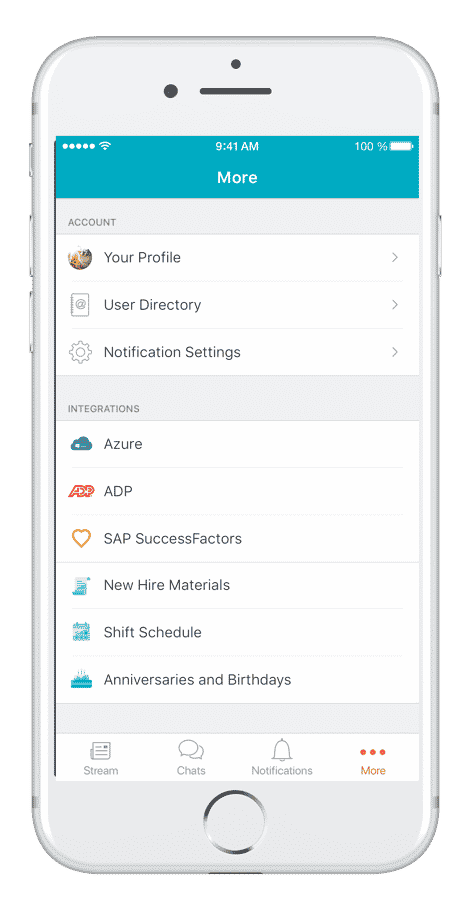
Build a custom connection via our API to synchronize important documents from SharePoint to Beekeeper's More tab. You can also build a two-way integration so that any post on SharePoint gets published to Beekeeper and vice versa. Comments and likes are also synched between the two apps.
Integration from Beekeeper to SharePoint:
Embed the Beekeeper Stream in a SharePoint page and allow your desktop employees to see what’s being published on Beekeeper.

Benefits of Beekeeper/SharePoint Integration
- Users can access communication directly from SharePoint and distribute
information across multiple devices, including with colleagues
who do not have an email address (such as frontline workers) - Send messages and information through Beekeeper and access it
directly from SharePoint - Share hyperlinks in Beekeeper to access documents saved in
SharePoint, such as Standard Operating Procedures
Integration Options for Beekeeper and SharePoint
One of the major perks to the Beekeeper SharePoint integration is its flexibility. There are several ways to integrate Beekeeper with SharePoint, offering your organization flexibility in how you share content between the two platforms.
- Website Embed
- App Extension with Single Sign-On
- RSS Feed Integration
- API Integration
For more information on how to integrate Beekeeper with SharePoint, click here.
Beekeeper and Microsoft Azure Integration
User management can be a serious challenge for enterprise companies. Beekeeper’s integration with Microsoft Azure’s Active Directory allows for easy user synchronization. If you use the Azure Active Directory to manage your employee information, then this Beekeeper integration allows you to automatically synchronize your Azure AD employee information with Beekeeper so that this employee info is always current.
Pro tip for HR leaders: Your IT Director will love this one.
Benefits of Beekeeper/Azure Integration
- Create custom segmentation with groups
- Ensure your employee data is always current
- Faster, easier, and safer than other importing methods
- Keep internal information secure by automatically removing employees once they separate from the company
- Save time and scale up
 Essentially, this is a user sync integration between Beekeeper and Microsoft Azure. It’s a plug and play integration to synchronize your Azure AD employee information to Beekeeper. We will set it up for you and it will run in the background. Every time a user is created in Azure AD, it will be automatically created in Beekeeper. If a user information is modified or the user is deleted, these changes will be reflected in Beekeeper.
Chalhoub + Beekeeper/Azure Integration = Match Made in Efficiency Heaven
Chalhoub Group is a massive retailer with over 600 stores across the Middle East. In an effort to unify their large team of frontline employees, Chalhoub implemented Beekeeper in 2018. When they needed a solution to automate user management for over 12,000 employees, the Microsoft Azure integration was a natural fit.
Here are just a few reasons why Chalhoub loves the Beekeeper Azure integration. . .
- There was no technical expertise required. Beekeeper configured the integration for them!
- They can automate user management with “Smart Groups.” All they have to do is tell us the attributes they want, and the groups will auto-update based on the parameters we create for them
- It automatically syncs user data at specified intervals. No manual updating required
- It’s a huge relief for IT because there’s no technical support needed. Everything is automated
Beekeeper/Microsoft Integrations With Zapier
You’ve mastered PowerPoint. You’ve conquered Outlook (mostly). You’ve learned every shortcut in Word. You know Yammer and SharePoint like the back of your hand. What’s next in your quest to be the ultimate Microsoft power user? It’s time to level up your software game with Zapier integrations.
Whether you’re a complete new-bee (see what we did there?) to the concept of an app integration, or you’ve been working with open APIs since you were a teenager, Zapier’s must-have Microsoft integrations offer a little something for folks at all levels of the app integration game.
Here are some of our favorite Microsoft app integrations you can do with Beekeeper using Zapier:
- Microsoft 365
Get new Office 365 emails in Beekeeper - One Drive
Automatically save attachments sent to you in a Beekeeper message to your One Drive folder - Microsoft Outlook
Send an email in Outlook based on triggers you specify in Beekeeper - Microsoft Excel
Automatically update a row in Excel based on event triggers in Beekeeper
Example: You’re an HR manager who has a mile-long Excel sheet with everyone's birthday inside and you want a way to automate birthday announcements. Create a Zap!
Microsoft has a virtually endless ecosystem of apps. Since Beekeeper is now available on the Zapier Marketplace, you can integrate your favorite internal communications app for frontline teams with over 1,000 other apps on the Zapier Marketplace!
The automation possibilities are literally endless. . .
Now go forth and discover how your very own app integrations can save you hours of time at work each week. May the automation force be with you.
Still searching for the perfect platform for your team? Download our ebook on how to choose the best team collaboration software to learn more!
About the author
Top