Crisis Communication: How to Build an Effective Crisis Communication Plan
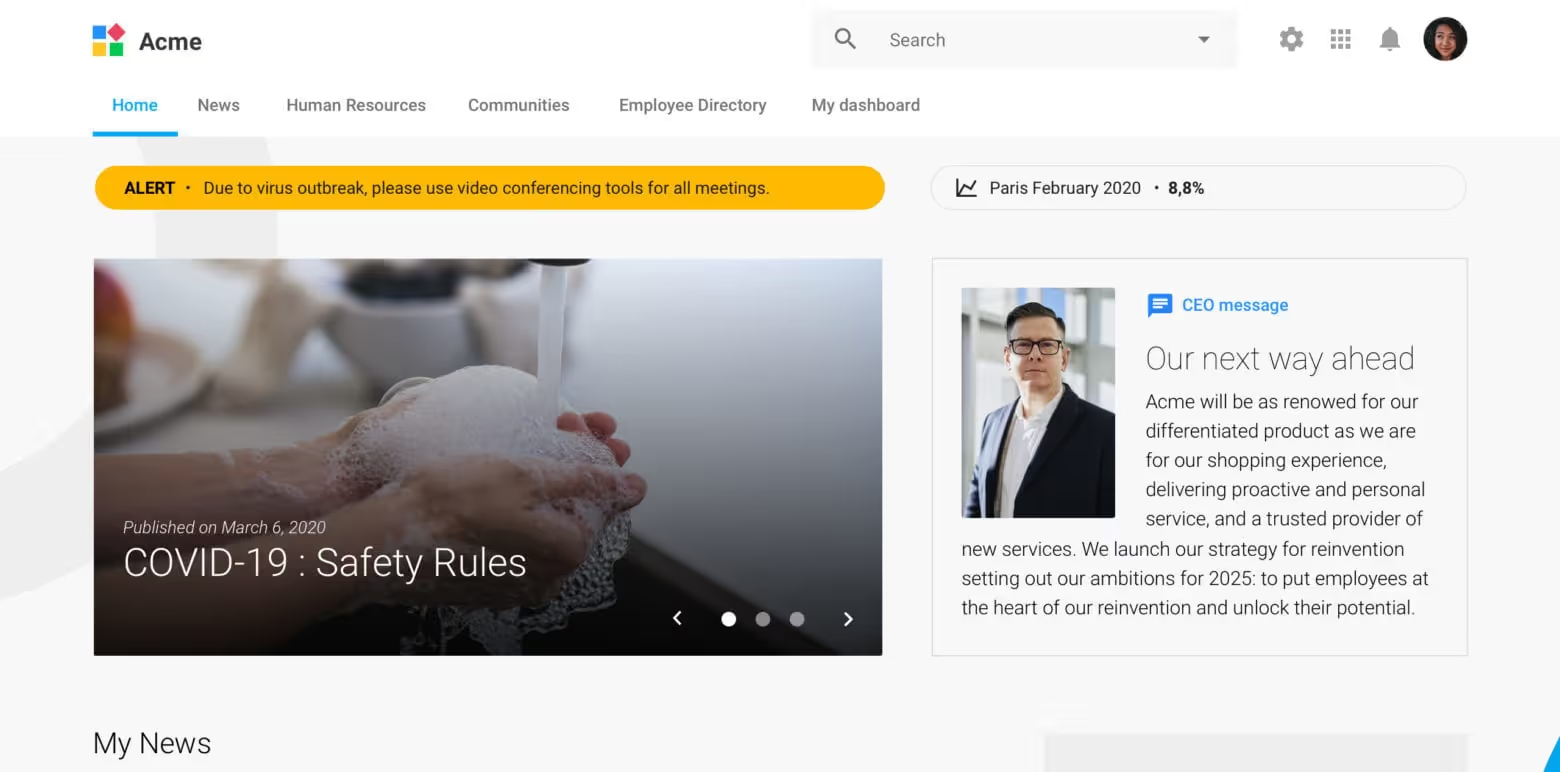
Crisis communication is no longer a reactive task reserved for major emergencies. It's part of how resilient organizations operate.
When disruption occurs, communication has to span teams, channels, locations, and languages without sacrificing accuracy. That becomes more complex when remote teams, frontline employees, multilingual audiences, regional locations, and workflows span multiple systems.
Strong crisis response depends on defined roles, reliable communication channels, two-way feedback loops, and centralized systems that enable employees to access accurate information quickly. A structured crisis communication plan brings those pieces together before disruption begins.
This guide explains what crisis communication is, why it matters, how to create a crisis communication plan, and how the right technology helps organizations keep employees informed during high-pressure moments.
What is crisis communication?
Crisis communication is the structured process an organization uses to communicate during events that may disrupt employees, operations, customers, or public trust. These messages, channels, responsibilities, and decision-making processes help leaders respond clearly and move forward when conditions change quickly.
Communication during a crisis can be external, internal, or both. External crisis communication focuses on customers, partners, media, regulators, and the public. Internal crisis communication focuses on employees, managers, leadership teams, and operational stakeholders.
The role of internal communication in a crisis is to give employees the first clear update. That way, they can carry out the response, serve customers, follow new guidance, and escalate issues as conditions change. Speed and trust are the most important factors.
Because crisis updates span leadership messages, operational alerts, manager communications, and employee feedback, they may draw from several types of internal communication at once.
Why crisis communication matters
Communicating well during a crisis protects more than an organization’s reputation. It supports safety, continuity, and trust when employees need direction most.
Employees look to their employer as a trusted source of information. Edelman’s 2025 Trust Barometer found that “my employer” remained the most trusted institution, even as trust dropped from 79% in 2024 to 76% in 2025.
When employees turn to their employer for direction, every update needs to be timely, useful, and consistent. Effective employee communication in times of crisis helps organizations:
- Support employee safety: Employees need clear instructions during emergencies, severe weather, security threats, and other high-risk events.
- Maintain operational continuity: Fast communication helps teams understand which systems, locations, workflows, or services are affected.
- Reduce misinformation: A single source of truth keeps employees from relying on rumors or informal updates.
- Align leaders and managers: Shared talking points ensure employees receive consistent guidance across teams and locations.
- Collect employee feedback: Two-way communication helps teams identify issues leadership may not see immediately.
- Reach global workforces: Mobile access, multilingual communication, and localized updates help employees act on relevant guidance.
The habits built during everyday communication carry into crisis moments. When employees already trust the organization’s internal communication channels, they’re more likely to rely on them during urgent situations.
What is a crisis communication plan?
A crisis communication plan is a documented framework that explains how an organization will communicate before, during, and after a disruption. It creates a roadmap for who owns communication decisions, which audiences and channels to use, how messages are approved, and how employees can ask questions or report issues.
When a crisis begins, teams have limited time to decide what to say, who should say it, and where the message should go.
For many organizations, a centralized communication platform makes the plan usable at scale. These platforms help organizations distribute updates quickly, collect employee feedback, reach frontline workers, and maintain clarity during rapidly changing situations.
How to create a crisis communication plan
Start with the questions teams will need to answer quickly during a disruption.
- What could disrupt the organization?
- Who needs to know?
- Who approves the message?
- Which channels reach each audience?
- How will employees ask questions or confirm they are safe?
Like a broader internal communication plan, a crisis plan should define audiences, responsibilities, channels, workflows, and measurement before communication becomes urgent. The plan should be simple enough to use under pressure, but detailed enough to move your teams in the same direction.
Identify crisis scenarios and risks
Map the high-impact situations that could affect employees, operations, customers, or trust. Common scenarios include:
- Operational outages
- Workplace emergencies or security threats
- Severe weather events
- Cybersecurity incidents
- Reputational, workforce, or supply chain disruptions
Once risks are identified, group them by urgency and impact so your teams know when to send targeted updates, mobile alerts, leadership messages, or ongoing FAQs.
Define roles and communication responsibilities
Crisis communication management works best when your teams have visibility into the process. They should know who drafts messages, approves them, publishes updates, and monitors employee response.
Typical responsibilities include:
- Leadership: Sets the tone and communicates priorities.
- Internal communications: Creates employee-facing updates and coordinates channels.
- HR: Addresses policies, benefits, safety guidance, and workforce support.
- Operations: Shares location-specific, frontline, or process updates.
- IT and security: Provides guidance during outages, cyber incidents, and access issues.
- Legal and compliance: Reviews sensitive or high-risk messaging.
- Managers: Reinforce updates and escalate employee feedback.
Clear ownership reduces confusion and helps employees hear aligned guidance from the people they already know and trust.
Establish communication channels
A crisis communication plan should define the purpose of each channel. This way, urgent alerts, leadership updates, employee questions, and post-crisis resources each have a clear place.
A strong channel mix may include:
- Mobile push notifications for urgent alerts
- A company intranet or employee hub for official updates
- Email for longer leadership messages or policy guidance
- Chat or messaging systems for fast team-level coordination
- Digital signage or local briefings for on-site workers
- Manager toolkits for team huddles and talking points
- Feedback forms, surveys, or comments for employee questions
- Multilingual updates for global or region-specific audiences
For example, during a weather closure, office employees may need an intranet banner and email update, while frontline teams may need mobile alerts, manager briefings, and translated FAQs.
Consider reviewing your broader internal communication methods alongside a crisis communication plan. Check that these updates fit into your larger communication ecosystem rather than operating as a separate process.
Create message approval and escalation processes
Ensure your approval workflows are fast enough for urgent updates and structured enough to protect accuracy. Define approval paths by crisis level:
- Level one: Targeted team or location update approved by operations and internal communications.
- Level two: Organization-wide operational update approved by leadership, HR, and internal communications.
- Level three: High-risk incident approved by executive leadership, legal, HR, communications, and response teams.
Centralized platforms can help teams manage approvals, distribute updates, and reduce version-control issues in one system.
Test and update the plan regularly
A crisis communication plan should evolve with the organization. New tools, new locations, new employee groups, and new risks can all change how communication should work.
Test the plan through:
- Tabletop exercises with leadership and response teams
- Simulated alerts across mobile, email, intranet, and chat
- Manager drills for team-level communication
- Employee surveys after simulations or real incidents
- Reviews of message reach, response times, and unanswered questions
- Translation and localization checks for global teams
After each test or real crisis, document what worked and what created friction. Then update the plan, templates, audience lists, approval flows, and channel guidance based on what you learned.
Best practices for crisis communication
During an urgent situation, the quality and speed of each message are essential. These crisis communication best practices help you deliver key updates your employees can understand, trust, and act on.
- Communicate early and frequently: Your employees need timely information, even when all details aren’t available. A first message can acknowledge the issue, explain what is known, provide immediate instructions, and tell teams when to expect another update. For example, during a cybersecurity incident, employees may need an immediate alert telling them to avoid suspicious links, pause system use, and check the employee hub for updates.
- Enable two-way communication and feedback: Internal crisis communication should give employees a clear way to ask questions, report local issues, and confirm whether guidance is working. For example, during a severe weather event, facility employees may report road closures, staffing gaps, or power outages.
- Centralize information in a single, trusted location: Employees need one destination for official crisis information, including current updates, FAQs, leadership messages, policies, contacts, and resources. A centralized hub gives employees one place to find the latest guidance.
- Prioritize frontline, mobile, and global employees: Crisis communication should reflect how different employees work. Distributed teams need mobile alerts, manager-led communication, location-based updates, or accessible formats. For example, during an operational outage, frontline employees may need mobile alerts and talking points, while office employees need system access instructions.
- Keep messaging clear, consistent, and localized: Crisis messages should be direct, calm, and easy to act on. Lead with what employees need to know: what happened, who is affected, what to do now, where to find updates, and who to contact. Local teams may need region-specific details, translated content, or guidance that reflects local requirements.
Common crisis communication challenges
Crisis communication can break down during handoffs between teams, tools, managers, regions, and employee groups. Common challenges include:
- Fragmented tools: Updates spread across email, chat, intranet pages, shared documents, and local conversations.
- Delayed communication: Teams wait too long for complete answers, leaving employees without basic direction.
- Inconsistent messaging: Leaders, managers, and departments share different guidance.
- Limited visibility: Organizations struggle to confirm whether updates reached frontline, mobile, or global employees.
- Misinformation: Employees fill gaps with assumptions when official updates are unclear.
- Lack of employee feedback mechanisms: Organizations miss employee questions, concerns, and local updates.
- Language barriers: Global employees may receive delayed or incorrect translations.
These challenges are easier to manage when crisis communication is built into the organization’s larger internal communication strategy, rather than treated as a one-time emergency workflow.
The role of technology in crisis communication management
During a crisis, technology helps communication teams move faster without losing message consistency. LumApps supports crisis communication by giving organizations a centralized employee hub for updates, internal communication tools, alerts, feedback, and knowledge.
For internal communications teams, the right platform can support:
- Targeted alerts and notifications by role, location, department, or audience
- Mobile communication for frontline, remote, and deskless employees
- A central source of truth for updates, FAQs, policies, and leadership messages
- Integrations with business systems, productivity tools, and communication channels
- Analytics to track reach, engagement, and communication performance
- Employee feedback collection through comments, surveys, forms, or communities
- Content localization and translation workflows for multilingual teams
- Governance and approval processes that keep messages consistent
Teams evaluating an intranet for internal communication should also consider how well it will work in a crisis. It should support urgent updates, employee feedback, and communication measurement.
Put your crisis communication strategy into action
Crisis communication requires preparation, not just quick reactions. A strong plan helps employees understand what is happening and keeps leaders aligned. It gives response teams a clear way to communicate across remote, frontline, global, and multilingual workforces.
LumApps helps organizations build that foundation with a connected employee hub. It supports everyday communication and urgent updates. With LumApps, communication teams can:
- Centralize official updates: Give employees one trusted place for crisis updates, FAQs, leadership messages, policies, and resources.
- Reach employees across channels: Share targeted updates through the intranet, email, mobile notifications, and connected channels.
- Support frontline workers: Help employees access important information from wherever they work.
- Target messages by audience: Send relevant updates by role, location, department, or employee group.
- Collect employee feedback: Give employees a way to ask questions, report local issues, and share what is happening on the ground.
- Measure communication reach: Use analytics to see which updates reach employees and where follow-up is needed.
- Connect workplace tools: Bring communications, resources, workflows, and business app integrations into one employee hub.
Explore LumApps internal communication solutions to see how a connected employee hub can support everyday communication and crisis readiness. Watch a video demo to see it in action.

Questions
Organizations should review their crisis communication plan at least once a year. They should also review it after any major incident, simulation, organizational change, or technology update. Update the plan when new locations, employee groups, languages, systems, or risks are introduced.
Crisis communication is harder in large organizations because employees work in many different ways. They work across different locations, roles, languages, time zones, and communication habits. Fragmented tools, unclear processes, and limited frontline visibility can also slow communication. They can lead to inconsistent messages.
Frontline employees are best reached through mobile alerts, manager briefings, and digital signage. Location-based updates and employee apps that do not require desktop access also work. Messages should be short, clear, and relevant to the employee’s role, location, and shift.
Tools that support crisis communication at scale include:
- Employee hubs
- Intranets
- Mobile apps
- Alert systems
- Chat integrations
- Feedback tools
- Analytics dashboards
- Translation workflows
The strongest approach brings these channels together. That way employees know where to find official updates.
Organizations plan translation workflows in advance and prioritize the most critical messages. They also localize updates for each region. A centralized communication platform can help teams manage translated content and publish updates consistently. It can also give employees access to information in the language they understand best.
Communicate early and often, even before all details are known. Give employees a clear way to ask questions and report local issues. Keep official updates, FAQs, and contacts in one trusted location. Reach frontline, mobile, and global employees through the channels they use. Keep messages clear, consistent, calm, and localized.















Get started with LumApps
We would love to know more about your goals. How can we help?
