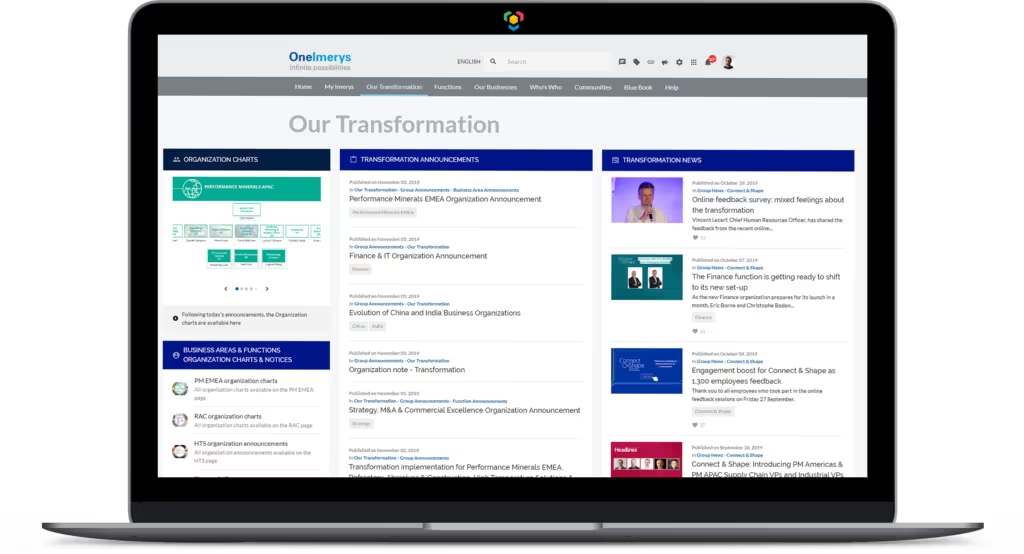
LumApps Integrates Comeen Play (formerly DynamicScreen) Digital Signage Solution
August 12, 2026 2:38 PM

Thuy-Mi Nguyen

Comeen Play logo with black stylized loops and blue curved line under black and blue text.

LumApps is proud to announce its new partnership with Comeen Play (formerly DynamicScreen). This new integration is available as of now. Thanks to Comeen Play, you can easily display your LumApps news anywhere on multiple screens.

Why LumApps x Comeen Play (formerly DynamicScreen)?

LumApps and Comeen Play (formerly DynamicScreen) have come together to extend your enterprise communications to new frontiers by providing a simpler, faster, and safer way to display your strategic messages on one or many screens, from anywhere.

Now you can share on your wall-mounted screens your LumApps news, welcome your new hires, promote your upcoming events, and more. Users from all business units and teams can benefit from this integration, which increases information visibility, empowers frontline workers, and improves brand awareness.

— Who’s Comeen Play?

Comeen Play helps you connect your screens with your LumApps intranet so your teams are aligned wherever they are located. No coding or design skills required! It’s Digital Signage. Simpler and smarter.

Comeen Play works with organizations of all sizes and industries worldwide, from fast-growing startups to Fortune 500 companies, including Google, Samsung, Spendesk, and Veolia.

Small paragraph style dolor sit amet, consetetur sadipscing elitr, sed diam nonumy eirmod.

What to expect?

Starting today, you can connect your LumApps intranet to Comeen Play, and share your LumApps news to your screens, so you keep every single employee connected to what matters.

— It’s simple to install—and to use. Set up your screens in no time. Comeen Play is compatible with almost any media player. The user-friendly interface makes it simple to connect your LumApps intranet and start sharing your news.

— It’s blazingly fast. Your LumApps news are instantly shared to your screens. The best part? It keeps in-sync so you don’t have to worry. You can even preview your content and schedule it in advance to display the right content at the right time.

— It’s engaging. Display on-brand screen-ready LumApps news at the speed of the light with our simplest editor. No design skills are required. Choose one of our Templates or create your own and edit it any time for quick and easy content changes.

Small paragraph style dolor sit amet, consetetur sadipscing elitr, sed diam nonumy eirmod.

LumApps / Comeen Play Use Cases

— Increase the visibility of your LumApps news and events: No matter where your employees work, on-site or deskless, every single employee is connected to what matters.

— Welcome your visitors with a personalized experience: Share your company news, and schedule a warm welcome message at the reception desk.

— Inform and Engage your frontline workers: Whether you share company news, key performance indicators, or legal notices, make your LumApps news and documents available anywhere.

Meet the author

Thuy-Mi Nguyen

“The Kitchen helped us deliver clear, consistent communication during intense change and has become part of everyday life for JETers worldwide.”

John Doe
Growth manager
at
Just Eat Takeaway
Button Text

From our experts and community

Visit Resource Center
September 25, 2026
A focused young woman frowns at her laptop while working at a desk in a bright office with a yellow and teal wall.
Blog Post
More technology, more friction? The next challenge of digital transformation
Resource Card
September 25, 2026
Blog Post
SharePoint as an intranet vs LumApps: which one is better?
Resource Card
September 25, 2026
Two women smiling and pointing at a laptop screen while sitting at a table in a bright room.
Blog Post
Change Management: Best Practices for Success
Resource Card
Two coworkers talking in an office with one taking notes and another wearing headphones around neck.
Checklist
Is Your Intranet Working? Free Legacy Intranet Checklist
Resource Card
May 29, 2026
Four construction workers in safety gear smiling with orange geometric overlay and checklist icon.
Checklist
How to improve communication and compliance on every job site
Resource Card
September 9, 2026
Event readiness timeline planner
Checklist
Event readiness timeline planner
Resource Card
May 21, 2026
The essential HR checklist for healthcare teams
Checklist
The essential HR checklist for healthcare teams
Resource Card
May 21, 2026
Modern office with a group meeting around a table and one woman sitting on a black chair using a laptop.
Checklist
Internal Communication Strategy
Resource Card
September 24, 2026
Smiling woman in white shirt holding an open sign in a bright coffee shop setting.
Checklist
Must-Have Features for Retailers
Resource Card
May 26, 2026
Two construction workers with helmets, one using a walkie-talkie, the other checking a tablet.
Checklist
Modernizing Communications with Frontline Employees
Resource Card
September 24, 2026
Smiling woman with earbuds uses laptop and holds smartphone at wooden table with coffee cup.
Checklist
Hybrid Work Checklist
Resource Card
September 24, 2026
Smiling man in glasses and checkered shirt working on a laptop at a bright home office desk.
Checklist
Data Driven Employee Experience: The IT Leader's To-Do List for Mastering Analytics
Resource Card
September 24, 2026
Two men fist bumping across a table with laptops, notebooks, and coffee cups in a casual workspace.
Checklist
6 ways to improve collaboration with an intranet
Resource Card
September 24, 2026
Four colleagues engaged in a lively discussion holding papers and notebooks near a laptop and window.
Checklist
7 steps to build the business case for an intranet
Resource Card
September 24, 2026
Three coworkers smiling and discussing work in a modern office with a wooden wall background.
Checklist
Battle of the Intranets: Meta Workplace vs LumApps
Resource Card
September 24, 2026
Man working on laptop at a wooden desk with another laptop, mouse, phone, and coffee mug nearby.
Checklist
Is your SharePoint intranet truly meeting your team’s needs?
Resource Card
May 11, 2026